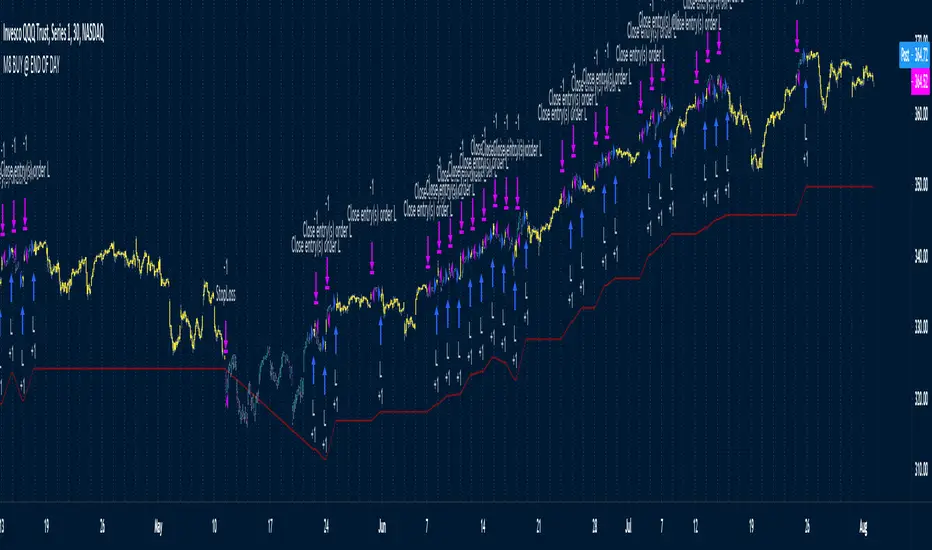
M8 BUY @ END OF DAYI've read a couple of times at a couple of different places that most of the move in the market happens after hours, meaning during non-standard trading hours.
After-market and pre-market hours and have seen data presented showing that systems which bought just before end normal market hours and sold the next morning had really amazing resutls.
But when testing those I found the results to be quite poor compared to the pretty graphs I saw, and after much tweaking and trying different ideas I gave up on the idea until I recently decided to try a new position management system.
The System
Buys at the end of the trading day before the close
Sells the next morning at the open IF THE CLOSE OF THE CURRENT BAR IS HIGHER THAN THE ENTRY PRICE
When the current price is not higher, the system will keep the position open until it EITHER gets stops out or closes on profit <<< this is WHY it has the high win %
The system has a high win ratio because it will keep that one position open until it either reaches profit or stops out
This "system" of waiting, and keeping the trade open, actually turned out to be a fantastic way to kind of put the complete trading strategy in a kind of limbo mode. It either waits for market failure or for a profit.
I don't really care about win % at all, almost always high win % ratio systems are just nonsense. What I look for is a PF -- profit factor of 1.5 or above, and a relatively smooth equity curve. -- This has both.
The Stop Loss setting is set @ .95, meaning a 5% stop loss. The Red Line on the chart is the stop loss line.
There is no set profit target -- it simply takes what the market gives.
Non-Repainting System
This does use a 200D Simple Moving Average as a filter. Like a Green Light / Red Light traffic light, the system will only trade long when the price is above its 200 Moving average.
Here is the code: "F1 = close > sma(security(syminfo.tickerid, "D", close ), MarketFilterLen) // HIGH OF OLD DATA -- SO NO REPAINTING"
I use "close ", so that's data from two days ago, it's fixed, confirmed, non-repainting data from the higher timeframe.
-- I would only suggest using this on direction tickers like SPY, QQQ, SSO, TQQQ, market sectors with additional filters in place.
ค้นหาในสคริปต์สำหรับ "stop loss"
Average Band by HarmanUsually, Moving Averages (Simple & Exponential) consider "close" of each candle to form a line for a particular period. In this indicator, we have considered all the parameters (Open, Close, Low & High) of each candle to form a Band or a wave which act as a zone to provide support & resistance. It works well on all the time frames. It perfectly works on lower time frames of 15 min & 5 min for intraday trades and even for scalping. There is a line that moves very near to candles known as "Candle Line" provide support & resistance to each individual candle and a leading line which moves ahead also acts as support & resistance and helps in determining trend direction.
How to use the indicator ?
Indicator consists of 3 components :
1) A Band or wave of 3 lines (upper, middle & lower line)
2) A "Candle Line" which moves along with the candles
3) A Leading line which moves ahead of the candles
Method 1 : When candles are being formed above the candle line (line near to candles) and it crosses the band or wave from below to upside, then long trade can be initiated. Similarly, When candles are being formed below the Candle line and it crosses the band or wave from upside then short trade can be initiated. Stop loss can be maintained below the band for Long trade and above the band for short trade. Candle line can be used to trail the stop loss.
Method 2: If candles moves above and below of the band very often and frequently and candle line is in the middle of candles then it is NO TRADING ZONE. If you still want to trade, then select a higher time frame and check the price movement. If there is a stability in the higher time frame, then take the trade in the higher timeframe with stable movement.
Method 3 : Candle line acts as "First line of Defence". In a uptrend, all the candles are formed above the candle line and in case of down trend, all the candles are formed below the candle line. When a newly formed candle cross the candle line then you can book profit. For Example : In uptrend , candles are being formed above the line, when a new candle started forming below the line and when the complete candle is formed below the line, profit can be booked. Vice-versa in case of downtrend.
Method 4: Direction of leading line, band and candle line helps in determining the trend. If all these three components are in upward direction, price trend is upward and if all these three components are in downward direction, then price trend is downward. When, leading line and band cross each other from opposite direction for consecutive 2-3 times, then price movement is sideways.
Method 5 : Thickness of band play an important role in determining price action. If band is narrow, it means small candles are being formed and no any huge price movement is observed in this period. When band started expanding, it signifies that big candles are begin to form and there is a more price movement than before. Similarly, If contraction of band started, it means that small candles are being formed and there is low price movement as compared to the price movement when Band was expanded. If Band is expanded (wider) and volumes are high, It means the Band will act as strong Support or Resistance than usual. In case, candles and candle line cross the expanded Band, you can enter the Long or Short trade.
Method 6: When the Band, leading line and candle line collides or meet at a single point, then it is either strong support or resistance.
Method 7 : Usage in Scalping : Select the shorter time frame of 1 min or 5 min. If the candles are crossing the band very frequently in 1 min, then select 5 min time frame or wait for few minutes for stability. Now, when candles started forming above the candle line and it crosses the band from below then take a long position and book profit after few candles above the band. Place stop loss below the Band. Similarly, when candles started forming below the candle line and it crosses the band from above, then enter into short trade and book profit after few candles. Place stop loss above the band in the case of short trade.
You can combine above methods to give a sharp edge to your trade and increase the probability of your winning in the trade.
Indicator Settings : Default period selected is 50 for both the Band and leading line. You can change the period to 26 or 100 or 200. Select the period and check the chart, if the indicator looks fine and smooth, then you can use your settings. For most of the time, default settings work perfectly.
Proudly Developed by :
Harmandeep Singh
Graduate in Computer Science with Physics & Mathematics
MBA in Business Marketing and Finance
Experienced Computer programmer & Software developer
Stock Market & Crypto Trader

Probability of ATR Index [racer8]Deriving the indicator:
PAI is an indicator I created that tells you the probability of current price moving a specified ATR distance over a specified number of periods into the future. It takes into account 4 variables: the ATR & the standard deviation of price, and the 2 parameters: ATR distance and # bars (time).
The formula is very complex so I will not be able to explain it without confusion arising.
What I can say is that I used integral calculus & the Taylor series to derive a formula that calculates the area under half of the normal distribution function. Thus, the formula was repeated twice in the code to derive the full probability (half + half = whole). If you can read the code, you might be wondering why the formula is so long...
The reason for this is because in Pine Script, the erf function doesn't exist. You see, the formula for normal distribution is: f(x) = (1/sqrt(2pi))*e^(-xx/2), assuming of course that the standard deviation = 1 and mu (mean) = 1. The next step is to take the integral of this formula in order to find the area under f(x). The problem is that I found the integral, F(x), of the normal distribution formula to be equal to F(x) = erf(x/sqrt(2))/2...and the erf function cannot be directly computed into Pinescript.
So I developed a solution...why not estimate the integral function? So that's exactly what I did using a technique involving the Taylor series. The Taylor series is an algebraic function that allows you to create a new function that can estimate the existing function. On a graph, the new function has the same values as the existing one, the only difference is that it uses a differnt formula, in this case, a formula that makes it possible to compute the integral. The disadvantage of using this new formula is that it is super long and if you want it to better represent the original integral over a wider range of x-values, you have to make it longer.
Signal Interpretion:
The hotter the colour, the more likely price will reach your specified distance.
The 2 values of PAI in the bottom window represent probability & average probability of your specifed distance geting hit.
Applications:
Stop loss placement---
This indicator is useful because it gives you an idea of the likelihood that a stop loss at a particular distance away from price (in ATRs) will be hit over a period of time specified. This is helpful in placing stop losses.
Options trading---
PAI can also be used in options trading. For example, you are using a strangle options strategy, and you want to make sure that price stays within the Strangle's profit range. So you only trade when PAI presents a low probability value of moving at a particular distance in ATRs over n periods.
Anyhow, I hope you guys like it. Enjoy! and hit that like button for me :)


mForex - Bollinger Bands - Pinbar scalping systemTransaction setup parameters
Time frame: M5, M15
Currency pair: Any except XAU/USD
Trading strategies
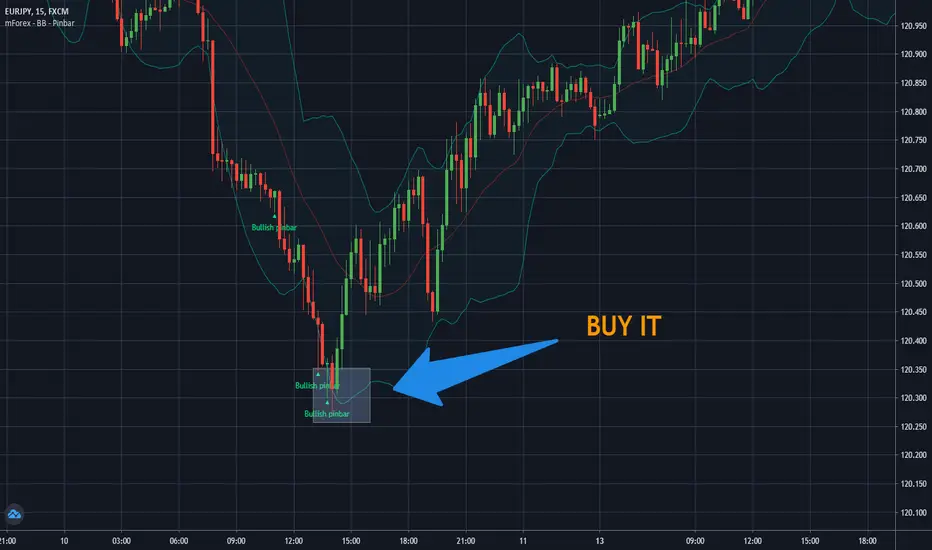
=== BUY ===
Price break out of the lower Bollinger Bands
The Pinbar reversal candlestick appears and closes the candle on the lower Bollinger Bands
Stop loss: Nearest bottom + 3-5 pips
Profit target: 10-20 pips
=== SELL ===
Price break out of the upper Bollinger Bands
The Pinbar reversal candle appeared and closed below the upper
Stop loss: Nearest peak + 3-5 pips
Profit target: 10-20 pips
* If you have any questions or suggestions for this strategy, feel free to ask us.
Noro's RiskChannel StrategyIndicator
The Donchian price channel is used. There are 2 methods available to close the position. The user can choose a method.
Wikipedia: en.wikipedia.org
Strategy #1 (stop-loss type = channel)
Old classic trading strategy, using breakouts of the Donchan price channel.
If the price is above the price channel top line, open the long position (and close the short position)
If the price is below the lower line of the price channel, open the short position (and close the long position)
It is recommended that you all use market stop orders.
Strategy #2 (stop-loss type = center)
This metod is better. This method is recommended.
The central line (red) is the middle of the Donchian price channel. Used to close any positions.
If the price is higher than the price channel top line, open the long position.
If the price is lower than the lower line of the price channel, open the short position.
If the price has crossed the central line of the channel, close any position.
It is recommended that you all use market stop orders.
Risk
There are 2 options. Risk for long positions and risk for short positions. This is the size of the possible loss. Order size depends on the possible loss and is calculated for each position.
For
BTC/USD, BTC/USDT, XBT/USD, ETH/USD, ETH/USD (need USD!)
Timeframes: 1h and length of price channel = 50 bars or 4h and length of price channel = 12

Hancock - Pump Catcher [BitMEX] [Alerts]This is a study to the version of the strategy found here .
It generates 3 alerts:
CLOSE - Triggers to close all open positions
LONG - Triggers to open a long position
SHORT - Triggers to open a short position
Commands for alerts (without stop-loss) to get you started:
CLOSE - a=bitmex e=bitmextestnet c=position t=market
LONG - a=bitmex e=bitmextestnet b=long s=xbtusd l=5 q=99% t=market
SHORT - a=bitmex e=bitmextestnet b=short s=xbtusd l=5 q=99% t=market
I would advise including a stop-loss with your commands. These commands are for autoview and don't include a stop loss, use autoview command documentation to add stop-loss.
Happy trading
Hancock

Customizable MACD (how to detect a strong convergence)Helloooo traders
I wondered once if a MACD was based on an EMA/EMA/SMA or SMA/SMA/EMA (or WHATEVA/WHATEVA/WHATEVA).
Seems they're so many alternatives out there.
I decided to empower my audience more by choosing the type of moving averages you want for your MACD.
More options doesn't always mean better performance - but who knows - some might find a config that they like with it for their favorite asset/timeframe.
I added also a multi-timeframe component because I'm a nice guy ^^
Convergence is my BEST friend
An oscillator (like MACD) is to measure how strong a momentum is - generally, traders use those indicators to confirm a trend.
So understand that a MACD (or any other indicator not based on convergence ) won't likely be sufficient for doing great on the market.
Combined with your favorite indicator, however, you may get great results.
My indicators fav cocktail is mixing :
1) an oscillator (momentum confirmation)
2) a trendline/key level break (momentum confirmation)
3) adding-up on a different trading method but still converging with the first entry.
The reason I'm deep with convergence detection is because I'm obsessed with removing those fakeout signals. You know which ones I'm talking about :)
Those trades when the market goes sideways but our capital goes South (pun 100% intended) - 2 days later, the price hasn't changed much but some lost some capital due to fees, being overexposed, buying the top/selling the bottom of a range they didn't identify.
It's publicly known that ranges are the worst traders' enemy. It's boring, not fun, and .... end up moving in the direction we expected when we go to sleep or outside.
NO ONE/BROKER/EX-GF is tracking your computer - I checked also for mine as it happened for me way too often in the past.
I surely preferred blaming a few external unknown conditions than improving my TA back in the days #bad #dave
But my backtest sir...
Our backtests show what they're being told to show . A backtest without a stop-loss/hard exit logic will show incredible results.
Then trying that backtest with live trading is like in the Matrix movie - discovering the real world is tough and we must choose between the blue pill (learning how to evaluate properly risk/opportunity caught) and the red pill (increasing the position sizing, not setting a stop loss, holding the positions hoping for the best)
Last few words
Convergences aren't invented because it's cool to mix indicators with others. (it is actually and even fun)
They're created to remove most of the fakeouts . For those that can't be removed - a strong risk management would cut most of the remaining potential big losses.
No system works 100% of the time - so a convergence system needs a back-up plan in case the converged signal is wrong (could be stop-loss, hard exit, reducing position sizing, ...)
Wishing you the BEST and happy beginning of your week
Daveatt

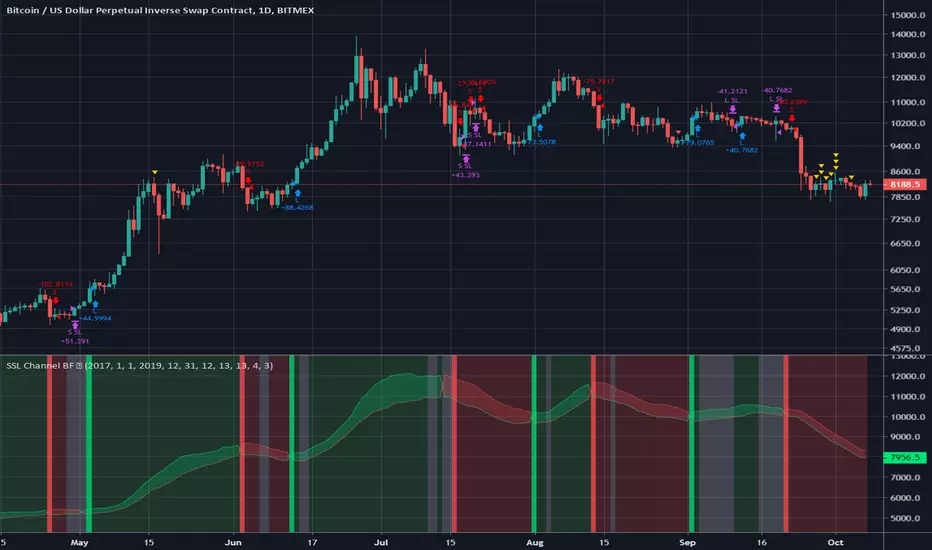
SSL Channel BFSSL Channel Close is a great all-rounder based on 2 Simple Moving Averages, one of recent Highs, one of recent Lows.
The calculation prints a channel on the chart consisting of 2 lines.
This strategy gives a Long signal when price closes above the top of these 2 lines and a Short signal when it closes below the bottom.
Trading in choppy sideways markets can compound losses so we avoid that here by using recent ATR to determine relative volatility and refrain from trading when the background is White.
We use a basic 3% stop loss.
Charted on XBT/USD Bitmex Daily chart.
INSTRUCTIONS
Green = long
Red = short
White Background= No trade
The way I have set this strategy up is that if we get stopped out but we are still in a green or red background, we re-enter. Closing the trade only occurs on an opposing signal or if we get stopped out.
Forex Master (EUR/USD)ATTENTION:
This is a symmetrical algorithm designed only for trading EUR/USD on the 1h time frame. For other currency pairs and time frames, you need to re-calibrate the RSI-EMAs as well as the profit targets and stop losses.
BACKTEST CONDITIONS:
Initial equity = $100,000 (no leverage)
Order size = 100% of equity
Pyramiding = disabled
TRADING RULES:
Long entry = EMA20(RSI10) cross> 50
Profit limit = 50 pips
Stop loss = 50 pips
Short entry = EMA30(RSI30) cross< 50
Profit limit = 50 pips
Stop loss = 50 pips
Long entry = Short exit
Short entry = long exit
DISCLAIMER: None of my ideas and posts are investment advice. Past performance is not an indication of future results. This strategy was constructed with the benefit of hindsight and its future performance cannot be guaranteed.

Crypto Institutional Liquidity Sweep StrategyStrategy Overview: Institutional Liquidity Sweep & Trend Convergence
This strategy is a high-conviction systematic trading framework designed to exploit "stop-runs" and liquidity grabs within a dominant market trend. It combines institutional price action concepts with mathematical filters to ensure entries occur only when trend direction, volatility, and liquidity align.
1. The Trend Framework (EMA 200 Filter)
The foundation of the strategy is the 200-period Exponential Moving Average (EMA). This acts as a "Directional North Star."
Long Bias: Trades are only considered when price is above the EMA 200.
Short Bias: Trades are only considered when price is below the EMA 200.
Buffer Logic: An optional percentage buffer can be applied to avoid "choppy" entries when price is hugging the moving average.
2. The Entry Trigger (Liquidity Sweeps)
The strategy identifies Institutional Liquidity Pools using Swing Highs and Swing Lows (Pivots).
The Sweep: The system waits for price to pierce below a recent structural low (Bullish Sweep) or above a recent structural high (Bearish Sweep).
The Trap: It then monitors for a "reclaim" where price quickly rejects the level. This suggests that the breach was not a breakout, but a hunt for stop-losses to fuel a move in the opposite direction.
3. Secondary Confirmation Filters
To maximize the win rate, the strategy requires a Secondary Filter to confirm market health (User selectable):
V olatility Oscillator: Ensures the market is in an Expansion Phase. It requires the oscillator to be rising, indicating that momentum is behind the reversal.
Smart Trendlines (Structure): Uses Linear Regression Slope to ensure the immediate micro-structure is aligned with the macro-trend.
4. Entry Confirmation (The Reversal Candle)
A trade is not triggered simply because a level was swept. The strategy requires a Reversal Confirmation:
Price Location: The candle must close in the upper 40% (for longs) or lower 40% (for shorts) of its total range.
Directional Body: The candle must close bullish for longs and bearish for shorts, confirming that buyers or sellers have seized control of the bar.
5. Risk Management (Fixed 1:2 RR)
The strategy prioritizes capital preservation through an ATR-based (Average True Range) risk model:
Static Exits: Upon entry, the Stop Loss and Take Profit levels are calculated and locked. They do not move, ensuring a mathematically pure 1:2 Reward-to-Risk ratio.
Volatility Adjusted: The distance of the stop loss is determined by the ATR, meaning the strategy automatically widens stops during high volatility and tightens them during calm periods.

Combined Advanced Blueprint + Hybrid Stop + GravityCombined Advanced Blueprint + Hybrid Stop + Gravity
Overview
This indicator is a comprehensive "Swiss Army Knife" trading system that combines the classic Traders Reality Blueprint (Moving Averages & Vector Zones) with advanced institutional volume detection (Gravity Squeeze & Sharks) and a Hybrid Trailing Stop for trade management.
It is designed to identify institutional footprints, trend direction, supply/demand zones, and volatility contractions in a single, all-in-one overlay.
🚀 Key Features
1. Gravity Squeeze & Shark Detection (Institutional Volume)
This module detects anomalies in volume and price action to identify where "Smart Money" is stepping in.
Shark Icons (🦈): Appear when the Negative Volume Index (NVI) detects significant accumulation during low volatility periods. This often signals a "defense" of a price level by institutions.
Shark Support (Blood) Zones: When a Shark is detected, a red box is drawn from the low of the candle. This represents an institutional "line in the sand." If price closes below this box, the zone is invalidated (broken).
Gravity Squeeze (⚡): Indicates a contraction in volatility (ATR compression), suggesting an explosive move is imminent.
Coils (🌀) & Hammers (🔨): Identifies specific price action patterns occurring on high relative volume.
2. The Blueprint Moving Averages
Includes the standard Traders Reality moving average sequence to identify trend state and dynamic support/resistance.
Red (8 EMA): Immediate trend.
White (21 EMA): Short-term trend (The "Baseline").
Blue (34 EMA): Trend confirmation.
Indigo (55 EMA) & Purple (89 EMA): Mid-term trend.
Orange (50 SMA) & Dark Orange (200 SMA): Major institutional levels (Golden/Death Cross).
Visual Crossovers: Arrows and shapes appear for 8/21 crosses, 8/34 crosses, and the 50/200 cross.
3. PVSRA (Price Volume Support Resistance Analysis)
Colors trade bars based on volume relative to the average, highlighting hidden liquidity.
Green/Red Bars: Volume is ≥ 200% of the average. (Climax action).
Blue/Violet Bars: Volume is ≥ 150% of the average.
Grey Bars: Average/Low volume.
Vector Zones: Automatically plots zones based on these high-volume candles to show where significant business was transacted.
4. Hybrid Trailing Stop
A volatility-based stop-loss system designed to keep you in the trend longer.
Calculation: Uses a combination of ATR (Average True Range) and manually input Implied Volatility (IV) to calculate a safe distance from price.
Visual: A Fuchsia line that trails behind price. When price closes across this line, the trend structure is considered broken.
5. Inflection Zones (Supply & Demand)
Auto-Drawing: Identifies Swing Highs and Swing Lows to draw Supply (Blue) and Demand (Red) boxes.
BOS (Break of Structure): When price breaks through a zone, the box is removed or converted, helping keep the chart clean.
6. Pivot Points & VWAP
Pivots: Displays multitimeframe pivots (Daily, Weekly, Monthly, etc.) including Traditional, Fibonacci, and Camarilla calculations.
VWAP: Includes Standard Deviation bands (1, 2, and 3 SD) anchored to Session, Week, Month, or even Earnings/Splits.
7. Keltner Channels & RSI Triggers
Entry Signals: Plots circles on the chart when RSI enters extreme zones (Overbought/Oversold) while price is interacting with the Keltner Channel bands.
🛠 Settings & Configuration
Gravity Squeeze & Sharks
Enable: Toggle the overlay on/off.
Min Volume: Set the threshold for volume analysis (Default: 300k).
Max ADX: Filters out signals if the trend is already too exhausted.
Inflection Zones
Swing Length: Sensitivity of the swing high/low detection.
History to Keep: How many historic zones to display before deleting old ones.
Pivot Levels
Timeframe: Auto-selects based on your chart, or force specific timeframes (e.g., Daily Pivots on a 15m chart).
Type: Choose between Traditional, Fibonacci, Woodie, etc.
Trailing Stop
Multiplier: Adjust how "loose" or "tight" the stop is (Default: 1.5 ATR).
IV %: Manually input the annual Implied Volatility for the asset for higher precision.
🎯 How to Trade (Strategy Ideas)
1. The Shark Defense:
Look for a Shark Icon (🦈).
Watch the red "Blood" box form.
Long Entry: If price retests the box and holds (does not close below it), this is a high-probability buy zone.
Stop Loss: A candle close below the red box.
2. The 8/21 & 8/34 Cross:
Use the Arrows generated by the moving averages.
Combine with Vector Candles: If you get a Bullish Cross (Up Arrow) immediately following a Green/Blue vector candle, the move is supported by volume.
3. The Squeeze Breakout:
Look for the Squeeze Icon (⚡) indicating low volatility.
Wait for the Hybrid Trailing Stop line to flip (e.g., price crosses above the Fuchsia line) to confirm the breakout direction.
Alerts
The script includes built-in alert conditions for automation:
8/21 Bullish/Bearish Cross
8/34 Bullish/Bearish Cross
Credits:
Core logic based on Traders Reality (Blueprint/PVSRA).
Gravity logic adapted from standard institutional volume analysis.
Compiled & Enhanced by Gemini.

ZERO LEVEL ENTRY BY SIDDAM RAJUOverview The Intraday Low Tracker is a specialized price-action strategy designed to catch potential reversals or pullbacks from new intraday lows. Unlike standard indicators that repaint or give premature signals, this tool uses a strict "Wait & Break" logic. It identifies a new low, waits for a confirmation candle, and only triggers an entry if the market proves strength by breaking above that confirmation level.
How It Works (The Logic)
Identifies the Low: The indicator continuously tracks the market to find the lowest low of the current day.
The "After Candle" Setup: Once a new low is established, the indicator waits for the immediate next candle (the "After Candle") to close.
The Setup Zone:
Green Line (Entry): Drawn at the High of the "After Candle."
Red Line (Stop Loss): Drawn at the Day Low.
The Trigger (Strict Entry):
A signal is NOT counted just because lines are drawn.
The system enters "WAITING FOR BREAKOUT" mode.
An entry is valid ONLY if price actively breaks ABOVE the Green Entry Line.
Trade Management: Once triggered, the trade remains active until it hits the user-defined Target (Blue Line) or the Stop Loss (Red Line).
Key Features
Strict Breakout Logic: Prevents false entries by requiring price to actually move above the setup candle.
Live Dashboard: A clean table on the chart displays:
Status: "Scanning", "Waiting for Breakout", or "Trade Active".
Levels: Exact prices for Entry, Target, and Stop Loss.
Statistics: Tracks "Total Entries", "Targets Hit", and "SL Hit" for the current session.
Visual Clarity:
Green Entry Label: Appears ABOVE the confirmation candle.
Red SL Label: Appears BELOW the confirmation candle.
Dynamic Lines: Lines automatically update or vanish if a setup is invalidated (e.g., if a new lower low is made before entry).
Settings
Target Profit %: Set your desired percentage gain (default is 10%).
Visual Customization: Change line colors, styles, and widths to fit your chart theme.
Table Size: Adjust the dashboard size (Tiny, Small, Normal, Large).
How to Use
Apply the indicator to your intraday timeframe (e.g., 1-minute, 5-minute).
Wait for the Green/Red lines and the "ENTRY" label to appear.
Do not enter immediately. Watch the status table.
Enter the trade only when price crosses the Green Line.
Exit at the Blue Target Line or if price falls back to the Red SL Line.
Disclaimer This tool is for educational and informational purposes only. Past performance does not guarantee future results. Always manage your risk properly.

Smart SafeZone Stops [MarkitTick]💡 This script represents a sophisticated evolution of volatility-based trailing stop methodologies. It is designed to assist traders in managing trend-following positions by dynamically adjusting stop-loss levels based on market noise, directional momentum, and volume flows. Unlike static trailing stops that move by a fixed percentage or simple ATR multiples, this tool calculates the "safe zone" by analyzing how far price has penetrated against the trend over a specific lookback period, offering a granular approach to risk management that adapts to changing market conditions.
✨ Originality and Utility
The primary utility of this indicator lies in its ability to filter out market noise while remaining tight enough to protect profits during strong trends. While the classic SafeZone concept (popularized by Dr. Alexander Elder) is effective, this script introduces several modern enhancements that increase its robustness:
● Dynamic ADX Integration Standard SafeZone stops use a fixed multiplier. This script integrates the Average Directional Index (ADX) to gauge trend strength. When the trend is strong, the stop tightens (Aggressive Multiplier) to lock in profits rapidly. When the trend is weak or choppy, the stop widens (Conservative Multiplier) to prevent premature shakeouts. ● Volume-Weighted Noise Price movement on low volume is often considered "noise," while high-volume movement signifies conviction. This script optionally weights the noise calculation by Relative Volume. A downward spike on low volume will affect the stop level less than a downward spike on high volume.
● 3-Day Smoothing Mechanism To prevent the stop line from becoming too jagged or reacting to single-bar anomalies, the script applies a 3-day smoothing algorithm. It utilizes the "worst-case" scenario of the last three calculated stop levels, ensuring the stop only moves when the trend structure genuinely shifts.
🔬 Methodology and Concepts
The underlying logic operates on a "Ratchet" mechanism, meaning the stop line can only move in the direction of the trade (up for longs, down for shorts) and never retraces until a trend reversal occurs.
● Directional Noise Calculation The script separates market noise into two components: Downside Penetration (for Longs): The distance the price dips below the previous bar's low. Upside Penetration (for Shorts): The distance the price spikes above the previous bar's high. The average of these penetrations is calculated over the Noise Lookback Period .
● The SafeZone Formula The raw stop level is derived as follows: Long Stop = Previous Low - (Average Downside Noise × Multiplier) Short Stop = Previous High + (Average Upside Noise × Multiplier)
● Adaptive Multiplier Logic If Dynamic ADX is enabled: If ADX > Strong Threshold: Use Aggressive Multiplier (e.g., 1.5x). If ADX < Weak Threshold: Use Conservative Multiplier (e.g., 3.5x). Otherwise: Use the Base Safety Coefficient.
● Exhaustion Detection The script calculates the distance between the current Close price and the Active Stop. If this distance exceeds a specific multiple of the ATR (Average True Range), it flags a "Mean Reversion" or "Exhaustion" warning, suggesting price has extended too far from equilibrium.
🎨 Visual Guide
The indicator plots distinct visual elements to guide decision-making without cluttering the chart excessively.
● Trailing Stop Lines Green Line (Solid): Represents the SafeZone Long Stop. This line appears below price during an uptrend. As long as price closes above this line, the bullish bias is intact. Red Line (Solid): Represents the SafeZone Short Stop. This line appears above price during a downtrend. A close above this line signals a potential short exit or reversal.
● Trend Signals Green Triangle (Below Bar): Marks the "Bull Start." This occurs when the price crosses above the Trend Filter EMA and the trend logic flips to bullish. Red Triangle (Above Bar): Marks the "Bear Start." Indicates the start of a downtrend sequence.
● Exhaustion Warnings Yellow Labels (⚠️): These appear when price has extended significantly away from the stop line (based on the ATR Exhaustion Multiplier). This is not an immediate sell signal but a warning that the trend may be overextended and a pullback is probable.
● MTF Consensus Cloud Background Color: If enabled, the chart background changes color to reflect the Higher Timeframe (HTF) trend. Green Background: Current trend matches HTF Uptrend. Red Background: Current trend matches HTF Downtrend. Gray Background: Trends are mismatched (Consolidation/Conflict).
● Quantitative Dashboard A table located in the top-right corner displays real-time statistics: Trend: Current state (BULLISH/BEARISH). Age: Number of bars since the trend began. Stop Price: Exact price level of the trailing stop. Risk %: The percentage distance from the current Close to the Stop. If this exceeds 3%, the text turns red to highlight elevated risk. Active Mult: The current multiplier being used (Dynamic or Fixed). ADX State: Shows if the trend is Strong, Weak, or Normal.
📖 How to Use
1. Entry Timing Wait for a Trend Switch signal (Triangle). For a long entry (Green Triangle), ensure the price is above the Trend Baseline (EMA). Ideally, look for confluence with the MTF Cloud (Green Background).
2. Position Management Once in a trade, use the Trailing Stop Line as your hard exit or invalidation point. Do not manually move the stop away from price; the script automatically "ratchets" the stop tighter as the trend progresses.
3. Taking Profits Use the "Exhaustion Warnings" (⚠️) as opportunities to scale out of positions. When price moves parabolically away from the stop line, the probability of a snap-back increases.
4. Managing Chop If the dashboard shows "ADX State: WEAK," expect the stop line to remain wider. This allows the asset "room to breathe" without stopping you out on random volatility.
⚙️ Inputs and Settings
The script is highly customizable to fit different asset classes (Crypto, Forex, Stocks).
● Trend Definitions Trend Filter (EMA Length): Determines the baseline trend bias (Default: 22). Price must be above this EMA to initiate a long calculation.
● Noise Calculation Noise Lookback Period: The number of bars used to calculate average penetration (Default: 10). Base Safety Coefficient: The standard multiplier applied to the noise average (Default: 2.5). Higher values = wider stops. Use Volume Weighting: Enables the volume-adjustment logic. Use 3-Day Smoothing: Recommended keeping this TRUE to avoid stop-hunts.
● Dynamic Multiplier (ADX) Enable Dynamic ADX: Toggles the adaptive multiplier. Strong/Weak Thresholds: The ADX levels that trigger aggressive or conservative multipliers.
● Multi-Timeframe Consensus Higher Timeframe: Select the TF for the cloud background (e.g., Daily or Weekly).
● Exhaustion Warning ATR Multiplier: Defines how far price must be from the stop to trigger a warning (Default: 3.0).
🔍 Deconstruction of the Underlying Scientific and Academic Framework
The "Smart SafeZone" indicator is grounded in the statistical analysis of market noise versus signal.
● Theory of Noise Penetration Conventional stops often use Standard Deviation (Bollinger Bands) or Average True Range (Keltner Channels/Chandelier Stops). While effective, these measures assume volatility is symmetrical. This script adopts the view that directional volatility matters more. In an uptrend, upside volatility is "good" signal, while downside volatility is "noise." By explicitly calculating the average downside penetration (Low - Low), the script isolates the specific counter-trend force acting on the asset. ● Volume-Weighted Price Analysis (VWPA) The inclusion of volume weighting draws upon Dow Theory principles, which state that volume must confirm the trend. Math: Penetration × (Volume / AverageVolume) This formula asserts that a price drop on low volume is statistically less significant than a drop on high volume. By dampening the impact of low-volume moves, the stop becomes more resistant to liquidity vacuums and algorithmic stop-hunts.
● Trend Efficiency (ADX) The integration of J. Welles Wilder’s ADX (Average Directional Index) adds a dimension of Trend Efficiency. High ADX values indicate a highly efficient trend with little retracement. Mathematically, this justifies a lower standard deviation (or noise multiplier) for the stop, as the probability of a deep retracement without a trend change is lower in high-momentum environments.
⚠️ Disclaimer
All provided scripts and indicators are strictly for educational exploration and must not be interpreted as financial advice or a recommendation to execute trades. I expressly disclaim all liability for any financial losses or damages that may result, directly or indirectly, from the reliance on or application of these tools. Market participation carries inherent risk where past performance never guarantees future returns, leaving all investment decisions and due diligence solely at your own discretion.

[TehThomas] - Order Blocks█ OVERVIEW
This Order Blocks indicator identifies institutional-level support and resistance zones using fractal pattern recognition combined with Fair Value Gap (FVG) filtering. Order blocks represent areas where large institutional orders have been placed, creating significant price reactions when retested. This indicator uses a 5-bar fractal pattern to detect market structure breaks and highlights the last bearish or bullish candle before a strong impulse move.
█ KEY FEATURES
- Fractal-Based Detection: Uses 5-candle fractal patterns to identify key market structure highs and lows
- FVG Filtering: Optional Fair Value Gap confirmation ensures order blocks are followed by true market imbalances
- Automatic Mitigation: Order blocks are automatically removed when price breaks through them
- Overlap Prevention: Prevents cluttered charts by avoiding overlapping order block zones
- Customizable Display: Full control over colors, labels, line heights (body/wick), and maximum blocks shown
- Dual Polarity: Detects both bullish (OB+) and bearish (OB-) order blocks independently
█ HOW IT WORKS
The indicator scans price action for fractal patterns where the middle candle forms a local extreme (highest high or lowest low among 5 bars). When price breaks above a fractal high or below a fractal low, the script identifies the last opposing candle in the impulse move as the order block.
For bearish order blocks, it finds the highest bullish candle before a fractal low is broken, marking institutional selling pressure. For bullish order blocks, it locates the lowest bearish candle before a fractal high is breached, indicating institutional buying.
When FVG filtering is enabled, the indicator confirms that a Fair Value Gap (a 3-candle imbalance where price leaves an unfilled gap) occurred within the specified distance from the order block. This combination increases the probability that institutional traders are present in these zones.
█ SETTINGS
Bullish Order Block Settings
- Show/hide bullish order blocks
- Customize fill color and border color
- Toggle OB+ label display
Bearish Order Block Settings
- Show/hide bearish order blocks
- Customize fill color and border color
- Toggle OB- label display
Label Settings
- Label size: Tiny, Small, Normal, or Large
- Label text color customization
General Settings
- Bars Back to Check (10-200): Lookback period for order block detection
- Filter by FVG: Requires Fair Value Gap confirmation
- Max Bars Between OB and FVG (1-6): Distance tolerance for FVG filtering
- Line Height: Choose between Body or Wick for order block boundaries
- Prevent Overlapping OBs: Avoids drawing overlapping zones
- Max Order Blocks to Display (1-50): Limits active blocks on chart
- Length of Boxes (10-100): Horizontal projection length
█ HOW TO USE
1. Add the indicator to your TradingView chart
2. Configure settings based on your trading timeframe and style
3. Watch for OB+ labels (bullish order blocks) as potential support zones where price may bounce
4. Watch for OB- labels (bearish order blocks) as potential resistance zones where price may reverse
5. Wait for price retracement to the order block zone before taking entries
6. Use confirmation signals like volume spikes or reversal patterns at the order block
7. Place stop loss just outside the order block boundary to manage risk
8. Monitor mitigation: Order blocks disappear when price breaks through them completely
█ TRADING STRATEGY EXAMPLES
Bullish Order Block Strategy
Wait for a market structure shift from bearish to bullish. When price creates a bullish impulse breaking a fractal high, identify the OB+ zone. Enter long positions when price retraces to test the bullish order block, placing stop loss 10-20 pips below the zone's low. Target previous highs or resistance levels.
Bearish Order Block Strategy
Monitor for market structure shift from bullish to bearish. After price creates a bearish impulse breaking a fractal low, locate the OB- zone. Enter short positions when price retraces to test the bearish order block, placing stop loss 10-20 pips above the zone's high. Target previous lows or support levels.
FVG-Confirmed Entries
Enable FVG filtering to only display order blocks validated by Fair Value Gaps. These aligned setups increase probability as they combine institutional order placement with market inefficiencies. Trade retracements to these high-confluence zones for better risk-reward ratios.
█ IDEAL FOR
- ICT Traders: Follows Inner Circle Trader methodology for institutional order flow
- Smart Money Concepts: Tracks where large players place orders
- Swing Traders: Identifies key support/resistance for multi-day holds
- Price Action Traders: Pure chart-based approach without lagging indicators
- Breakout Traders: Confirms structure breaks with fractal patterns
- Forex, Crypto, and Stock Markets: Works on all liquid markets and timeframes
█ TECHNICAL SPECIFICATIONS
- Max Boxes: 500
- Max Labels: 500
- Detection Method: 5-bar fractal pattern recognition
- Mitigation Logic: Automatic removal when price breaks order block boundaries
- Time Projection: Uses time offset calculations for box extension
- Array Management: Dynamic array cleanup to prevent memory issues
█ NOTES & DISCLAIMERS
- Order blocks work best when combined with overall market context and trend analysis
- Not all order blocks result in price reversals; use proper risk management
- FVG filtering may reduce the number of signals but increases quality
- Fractal patterns require 5 bars to form, causing a 2-bar delay in detection
- Works optimally on higher timeframes (4H, Daily) for institutional footprints
- This indicator does not guarantee profitable trades; always use stop losses
- Past performance of order blocks does not predict future results
- Compatible with other ICT concepts like liquidity sweeps and market structure

Profit Punch: Risk & Target Planner (ATR + Fixed R)Profit Punch: Risk & Target Planner (ATR + Fixed R)
This indicator is a complete trade planning tool designed to visualize your Risk (R) and Reward levels instantly. Whether you use a volatility-based strategy (ATR) or precise manual levels, this tool draws your roadmap directly on the chart.
It solves the problem of calculating "R-Multiples" manually and ensures every trade plan is consistent.
Key Features
1. Smart Risk Calculation
Auto Mode (ATR): Uses the stock's daily volatility (ATR) to automatically suggest a logical Stop Loss.
Manual Mode: Lets you type in your exact Stop Loss price (e.g., below a recent low), and the tool automatically adjusts your Profit Targets to match that specific risk.
2. Hybrid Targeting (The "Nuance")
You can set a tight manual stop but keep your profit targets based on daily volatility (ATR). This allows for "Hybrid" setups where you risk a small amount (tight stop) but aim for a standard volatility move (ATR targets).
3. Backtesting Friendly
Use the "Target Date" feature to apply the tool to any past candle. It will calculate the targets based on what the volatility was on that specific day , allowing you to accurately review past trades.
4. Clean & Customizable
Editable Labels: Rename "1R" to "Goal 1" or "Take Profit".
Clean Look: Toggle any line on/off to keep your chart simple.
Timeframe Independent: Calculations are always anchored to Daily data for consistency, even if you are viewing a 5-minute chart.
How to Use
Step 1: Add to Chart. The lines will appear on the latest bar by default.
Step 2: Set Entry. In Settings, check "Use Manual Entry" to type your exact buy price, or leave unchecked to use the closing price.
Step 3: Set Stop. Choose "Auto (ATR)" for a volatility-based stop, or "Manual Price" to type in your specific stop level.
Step 4: Visualize. The tool draws your 1R, 3R, 5R, and 7R targets instantly.
Settings Guide
Risk Factor: Multiplier for the ATR calculation (Default is 1.5).
Target Base: Choose whether profit targets are multiples of your Stop Distance (Classic) or Fixed ATR (Volatility).
Custom Labels: Change the text displayed on the chart (e.g., "Safe Exit" instead of "1R").
Who is this for?
This tool is built for swing traders, educators, and anyone who uses "R-Multiples" (Risk Units) to manage their portfolio. It is especially useful for creating consistent trade plan screenshots.

ATR Value Number Display Only (No line chart)OVERVIEW:
The ATR (Average True Range) Value Display provides a clean, always-visible ATR reading on your chart. This essential volatility indicator helps traders set appropriate stop losses, position sizes, and profit targets based on current market volatility.
KEY FEATURES:
• Real-Time ATR Display: Shows current ATR value in a clean table format
• Customizable Appearance: Fully customizable text and background colors
• Adjustable Period: Standard 14-period default with full customization
• Bottom-Right Positioning: Non-intrusive placement that doesn't obstruct price action
• Tick Precision: Displays ATR value with accurate tick formatting
• Lightweight: Minimal resource usage with maximum clarity
HOW TO USE:
1. Add the indicator to any timeframe chart
2. Adjust ATR Length based on your trading style (14 is standard)
3. Customize colors to match your chart theme
4. Use ATR value to:
- Set stop loss distances (e.g., 1.5x ATR)
- Calculate position sizes based on risk tolerance
- Identify increasing/decreasing volatility trends
- Set realistic profit targets
SETTINGS:
• ATR Length: Calculation period (default: 14)
• Text Color: Customize the ATR text color (default: white)
• Box Color: Customize the background box color (default: semi-transparent blue)
PERFECT FOR:
✓ Position sizing based on volatility
✓ Setting dynamic stop losses that adapt to market conditions
✓ Identifying high/low volatility periods
✓ Comparing volatility across different instruments
✓ Risk management and trade planning
WHAT IS ATR?
Average True Range (ATR) measures market volatility by calculating the average range between high and low prices over a specified period. Higher ATR values indicate higher volatility, while lower values suggest calmer markets.
TIP: Use ATR on multiple timeframes to understand volatility across different trading horizons.

VIX Crossing# VIX Crossing Strategy
## Overview
VIX Crossing is a quantitative trading strategy that combines volatility signals from the VIX index with trend confirmation from the Nasdaq-100 (NDX) to generate long entry signals. The strategy employs multiple exit conditions to manage risk and lock in profits systematically.
## Strategy Logic
### Entry Condition
The strategy initiates a long position when:
- **VIX Crossunder**: The VIX closing price crosses below its 5-bar simple moving average (SMA), signaling a decrease in implied volatility
- **AND NDX Confirmation**: The Nasdaq-100 closes above its 21-bar exponential moving average (EMA), confirming uptrend strength
This dual-signal approach reduces false entries by requiring both volatility normalization and positive market momentum.
### Exit Conditions
The strategy automatically closes positions when any of the following conditions are met:
1. **VIX Crossover (Volatility Exit)**: VIX closes above its SMA, indicating rising volatility
2. **Time-Based Exit**: Position is force-closed after 10 bars from entry, preventing prolonged drawdowns
3. **Take-Profit Exit**: Position closes when unrealized profit exceeds $3,000 per contract
4. **Stop-Loss Exit**: Position closes when unrealized loss exceeds $1,500 per contract
Exit conditions are evaluated each bar while the position is open, with explicit logging of the exit reason for trade analysis.
## Configuration Parameters
| Parameter | Default | Purpose |
|-----------|---------|---------|
| VIX SMA Length | 5 | Smoothing period for VIX volatility baseline |
| NDX EMA Length | 21 | Smoothing period for Nasdaq-100 trend confirmation |
| Force Close After X Bars | 10 | Maximum holding period in bars |
| TP Amount per Contract | $3,000 | Profit target per contract |
| SL Amount per Contract | $1,500 | Loss limit per contract |
## Risk Management Features
- **Position Sizing**: Capital allocation based on profit/loss per contract rather than fixed units, allowing for scalable risk
- **Dual Risk Controls**: Combined time-based and price-based exits prevent extended exposure
- **Profit Asymmetry**: 2:1 profit-to-loss ratio encourages risk/reward discipline
- **Contract-Based Accounting**: Profit targets and stop losses scale with position size
## Capital Requirements
- **Initial Capital**: $50,000
- **Commission**: $3 per contract (cash-based)
- **Instrument**: Designed for index-based derivatives or equities with liquid options markets
## Technical Indicators Used
- Simple Moving Average (SMA) for VIX smoothing
- Exponential Moving Average (EMA) for NDX trend detection
- Crossover/Crossunder detection for signal generation
## Underlying Assumptions
1. VIX crossunder events represent mean-reversion opportunities in Nasdaq-heavy portfolios
2. NDX EMA confirmation filters out uncorrelated volatility spikes
3. 10-bar holding period aligns with typical mean-reversion timeframes
4. Contract-based profit targets accommodate varying leverage levels

Key Zone$ - Support and Resistance0DTE Bounce Zones (6M) — Support & Resistance with VWAP, Volume, and Risk Management
This indicator is built for intraday and 0DTE options trading, focused on high-quality bounce and rejection setups at historically proven support and resistance zones.
It automatically identifies key zones from six months of historical price action and waits for real-time confirmation before signaling CALL or PUT opportunities. The goal is to reduce noise, avoid weak bounces, and provide clear, rules-based trade structure.
====================================================================
CORE FEATURES
====================================================================
Historical Support & Resistance Zones (6 Months)
Zones are built using 15-minute pivot highs and lows.
A zone must be tested at least 3 times to be considered valid.
Nearby zones are merged automatically to reduce clutter.
Zones extend forward in time and update dynamically.
Support zones are shown in green, resistance zones in red.
These are higher-quality structural levels, not same-day levels.
====================================================================
0DTE-Focused Entry Logic
Signals only trigger when price interacts with a confirmed zone and shows a strong rejection candle.
Signals are limited to high-probability trading windows only.
Market Open: 9:30–10:45 ET
Market Close: 3:00–4:00 ET
This avoids midday chop and focuses on periods with real momentum.
====================================================================
VWAP Confirmation (Strict)
CALL setups require a VWAP reclaim.
PUT setups require a VWAP loss.
This aligns trades with institutional order flow instead of counter-trend noise.
====================================================================
MACD Momentum Filter
MACD histogram behavior is used to confirm momentum direction and avoid taking bounces against the prevailing move.
====================================================================
ATR Candle Strength Filter
The signal candle must be large enough relative to ATR.
This filters out weak or indecisive candles that often fail with 0DTE.
====================================================================
Advanced Volume Confirmation (Relative Volume)
Relative Volume (RVOL) is used instead of raw volume.
Different RVOL thresholds are applied for CALLS versus PUTS.
Higher RVOL is required for PUTS due to downside urgency.
Lower RVOL is allowed for CALLS due to grind-up behavior.
Separate RVOL thresholds are used for the market open and market close.
This ensures signals only occur when real participation is present.
====================================================================
Built-In Risk Management (2:1 Reward/Risk)
Every signal automatically calculates an entry, stop loss, and target.
Stop loss is based on the zone edge with an ATR buffer.
Targets default to a 2:1 reward-to-risk ratio.
Entry, stop, and target levels are drawn directly on the chart and included in alerts.
====================================================================
Smart Alerts (CALLS & PUTS)
Alerts trigger only when all conditions are met.
Alerts include trade direction, entry price, stop price, target price, and RVOL information.
Alerts are designed for 5-minute confirmation trading.
To use alerts, select “Any alert() function call” when creating the alert.
====================================================================
INTENDED USE
====================================================================
0DTE options trading.
5-minute chart confirmation.
Index ETFs and liquid equities such as SPY, QQQ, IWM, and SPX.
Traders who want aggressive entries with confirmation.
Traders who value structure, volume, and risk control.
====================================================================
NOTES
====================================================================
This is not a prediction tool.
Signals require discipline and confirmation.
Best results come from trading only the highest-quality setups.

Volatility Breakout System [Fixed Risk]
This is a trend-following breakout strategy designed to capture volatility expansion while filtering out low-momentum "chop." It is built on the philosophy that significant price moves are often preceded by a breakout of volatility bands (Keltner Channels) accompanied by Volume and Trend Strength (ADX).
Strategy Logic:
Volatility Breakout: The primary trigger is a candle closing outside the Keltner Channels. This indicates price is moving faster than the average range.
Trend Filter: Trades are only taken in the direction of the 200 EMA.
Momentum Filter (ADX): The ADX filter ensures we only enter when the trend strength is above a specific threshold (Default: 20). This prevents the strategy from buying tops or selling bottoms in ranging markets.
Volume Confirmation: A breakout without volume is often a fake-out. This script requires volume to be higher than the moving average.
Risk Management (Automated):
Stop Loss: Based on ATR (Average True Range) to adapt to current market volatility.
Trailing Stop: Once the trade moves in favor, a trailing stop is activated to lock in profits.
Breakeven: If price moves X% in favor, the Stop Loss is automatically moved to the entry price to protect capital.
Cooldown: Includes a safety mechanism to prevent over-trading immediately after a signal.
Backtesting Notes:
This script is set up with use_bar_magnifier=true. For accurate results, use this on higher timeframes (1H, 4H) or ensure you have a Premium account for intrabar inspection.
Inputs:
You can toggle the "Compounding" feature to test fixed cash vs. % equity growth.
Webhooks are fully configurable for alert automation.

Risk & Reward Position PlannerDescription
This script is a trade architecture tool designed to help traders calculate position sizes and visualize risk-reward ratios dynamically on the chart. It focuses on functional precision and clean aesthetics, offering two distinct visual styles: "Cyber" for modern high-tech charts and "Classic" for a traditional look.
Key Features
Interactive Setup: Upon adding the script or resetting, it prompts you to click directly on the chart to set your Entry and Stop Loss levels.
Dynamic Position Sizing: Calculates the total risk in currency (USD) based on your custom unit size.
Multi-Target Planning: Visualizes four customizable Take Profit targets based on specific RR ratios.
Cyber UI Aesthetics: Full control over colors, neon glow effects, and horizontal alignment to fit any chart layout.
Comprehensive Data: Displays price, percentage distance, currency risk, and RR ratios at a single glance.
User Guide (How to use)
To ensure the most efficient workflow, here are the essential steps for operating the tool:
Setting a New Trade (Resetting)
If you change your symbol or want to plan a completely new trade, you can clear the current setup and trigger the interactive selection again:
Right-click on the indicator in the chart OR click the three dots (...) next to the indicator name in the legend.
Select "Reset Points".
The indicator will prompt you to click two new points on the chart: first for the Entry, then for the Stop Loss.
Moving Entry and Stop Loss
Move the mouse over the line of the Entry or the StopLoss and grab the grip of the line to move it up or down. Drop it to the price you want to set.

UT Bot Alerts with R-Targets & Results< DONE BY RM ALOWAIS >
Indicator Overview
This indicator provides rule-based BUY and SELL signals with automatic risk management levels.
Each trade setup includes a predefined Stop Loss and up to three Take Profit targets (TP1, TP2, TP3), allowing traders to manage risk and scale exits systematically.
How It Works
BUY and SELL signals are generated based on internal market conditions.
Each signal plots:
Entry point
Stop Loss (SL)
Take Profit levels (TP1, TP2, TP3)
After price action completes, the indicator displays the actual result of the trade:
Result: TP1 / TP2 / TP3 / SL
Exit labels may appear when a trade is closed early due to invalidation or opposite conditions.
Key Features
Non-repainting signals
Built-in risk-to-reward structure
Visual trade tracking with clear outcomes
Suitable for intraday and swing trading
Works on multiple markets and timeframes
Usage Notes
This indicator is a decision-support tool, not financial advice.
Best results are achieved when used with proper risk management and higher-timeframe confirmation.
Performance may vary depending on market conditions (trend vs range).
Disclaimer
This script is provided for educational and informational purposes only.
The author is not responsible for any financial losses. Always test and validate before using in live trading.

HMA Trend Scalper V1[wjdtks255]
Overview
This indicator is a high-performance trend-following system optimized for crypto futures trading. It provides clear entry signals and dynamic, real-time risk management tools to help traders stay on the right side of the market.
Key Features
Dynamic Trend Tracking: Uses a specialized HMA (Hull Moving Average) to filter market noise and identify the core trend.
Real-time TP/SL Extension: Unlike static indicators, the Take Profit (TP) and Stop Loss (SL) lines extend candle-by-candle along with the price action.
Clean Chart UI: Lines only exist from the entry point to the current candle, preventing chart clutter.
Automatic Completion: Once the price hits a target, the line stops extending and marks the result (Target Hit or Stop Out).
Trading Strategy (How to Trade)
1. Long Entry (🚀 LONG)
Condition: The price must be above the trend line, and a breakout of the recent 5-candle high must occur with significant volume.
Action: Enter a Long position when the "🚀 LONG" label appears.
Exit: Hold until the price reaches the Cyan (Aqua) TP line or hits the Yellow SL line.
2. Short Entry (💀 SHORT)
Condition: The price must be below the trend line, and a breakdown of the recent 5-candle low must occur with significant volume.
Action: Enter a Short position when the "💀 SHORT" label appears.
Exit: Hold until the price reaches the Cyan (Aqua) TP line or hits the Yellow SL line.
3. Risk Management
Stop Loss: The indicator automatically calculates the optimal SL based on recent volatility (ATR) and swing points.
Take Profit: The TP is set at a calculated ratio to ensure a positive risk-to-reward setup.
Settings
Trend Sensitivity: Adjust the HMA length to match your preferred timeframe (Scalping vs. Swing).
Volume Multiplier: Filter out weak moves by increasing the volume breakout requirement.
Custom Styles: Fully customize line colors, widths, and styles (Solid, Dashed, Dotted) in the settings menu.

Global Sovereign Spread MonitorIn the summer of 2011, the yield on Italian government bonds rose dramatically while German Bund yields fell to historic lows. This divergence, measured as the BTP-Bund spread, reached nearly 550 basis points in November of that year, signaling what would become the most severe test of the European monetary union since its inception. Portfolio managers who monitored this spread had days, sometimes weeks, of advance warning before equity markets crashed. Those who ignored it suffered significant losses.
The Global Sovereign Spread Monitor is built on a simple but powerful observation that has been validated repeatedly in academic literature: sovereign bond spreads contain forward-looking information about systemic risk that is not fully reflected in equity prices (Longstaff et al., 2011). When investors demand higher yields to hold peripheral government debt relative to safe-haven bonds, they are expressing a view about credit risk, liquidity conditions, and the probability of systemic stress. This information, when properly analyzed, provides actionable signals for traders across all asset classes.
The Science of Sovereign Spreads
The academic study of government bond yield differentials began in earnest following the creation of the European Monetary Union. Codogno, Favero and Missale (2003) published what remains one of the foundational papers in this field, examining why yields on government bonds within a currency union should differ at all. Their analysis, published in Economic Policy, identified two primary drivers: credit risk and liquidity. Countries with higher debt-to-GDP ratios and weaker fiscal positions commanded higher yields, but importantly, these spreads widened dramatically during periods of market stress even when fundamentals had not changed significantly.
This observation led to a crucial insight that Favero, Pagano and von Thadden (2010) explored in depth in the Journal of Financial and Quantitative Analysis. They found that liquidity effects can amplify credit risk during stress periods, creating a feedback loop where rising spreads reduce liquidity, which in turn pushes spreads even higher. This dynamic explains why sovereign spreads often move in non-linear fashion, remaining stable for extended periods before suddenly widening rapidly.
Longstaff, Pan, Pedersen and Singleton (2011) extended this research in their American Economic Review paper by examining the relationship between sovereign credit default swap spreads and bond spreads across multiple countries. Their key finding was that a significant portion of sovereign credit risk is driven by global factors rather than country-specific fundamentals. This means that when spreads widen in Italy, it often reflects broader risk aversion that will eventually affect other asset classes including equities and corporate bonds.
The practical implication of this research is clear: sovereign spreads function as a leading indicator for systemic risk. Aizenman, Hutchison and Jinjarak (2013) confirmed this in their analysis of European sovereign debt default probabilities, finding that spread movements preceded rating downgrades and provided earlier warning signals than traditional fundamental analysis.
How the Indicator Works
The Global Sovereign Spread Monitor translates these academic findings into a systematic framework for monitoring credit conditions. The indicator calculates yield differentials between peripheral government bonds and German Bunds, which serve as the benchmark safe-haven asset in European markets. Italian ten-year yields minus German ten-year yields produce the BTP-Bund spread, the single most important metric for Eurozone stress. Spanish yields minus German yields produce the Bonos-Bund spread, providing a secondary confirmation signal. The transatlantic US-Bund spread captures divergence between the two major safe-haven markets.
Raw spreads are converted to Z-scores, which measure how many standard deviations the current spread is from its historical average over the lookback period. This normalization is essential because absolute spread levels vary over time with interest rate cycles and structural changes in sovereign debt markets. A spread of 150 basis points might have been concerning in 2007 but entirely normal in 2023 following the European debt crisis and subsequent ECB interventions.
The composite index combines these individual Z-scores using weights that reflect the relative importance of each spread for global risk assessment. Italy receives the highest weight because it represents the third-largest sovereign bond market globally and any Italian debt crisis would have systemic implications for the entire Eurozone. Spain provides confirmation of peripheral stress, while the US-Bund spread captures flight-to-quality dynamics between the two primary safe-haven markets.
Regime classification transforms the continuous Z-score into discrete states that correspond to different market environments. The Stress regime indicates that spreads have widened to levels historically associated with crisis periods. The Elevated regime signals rising risk aversion that warrants increased attention. Normal conditions represent typical spread behavior, while the Calm regime may actually signal complacency and potential mean-reversion opportunities.
Retail Trader Applications
For individual traders without access to institutional research teams, the Global Sovereign Spread Monitor provides a window into the macro environment that typically remains opaque. The most immediate application is risk management for equity positions.
Consider a trader holding a diversified portfolio of European stocks. When the composite Z-score rises above 1.0 and enters the Elevated regime, historical data suggests an increased probability of equity market drawdowns in the coming days to weeks. This does not mean the trader must immediately liquidate all positions, but it does suggest reducing position sizes, tightening stop-losses, or adding hedges such as put options or inverse ETFs.
The BTP-Bund spread specifically provides actionable information for anyone trading EUR/USD or European equity indices. Research by De Grauwe and Ji (2013) demonstrated that sovereign spreads and currency movements are closely linked during stress periods. When the BTP-Bund spread widens sharply, the Euro typically weakens against the Dollar as investors question the sustainability of the monetary union. A retail forex trader can use the indicator to time entries into EUR/USD short positions or to exit long positions before spread-driven selloffs occur.
The regime classification system simplifies decision-making for traders who cannot constantly monitor multiple data feeds. When the dashboard displays Stress, it is time to adopt a defensive posture regardless of what individual stock charts might suggest. When it displays Calm, the trader knows that risk appetite is elevated across institutional markets, which typically supports equity prices but also means that any negative catalyst could trigger a sharp reversal.
Mean-reversion signals provide opportunities for more active traders. When spreads reach extreme levels in either direction, they tend to revert toward their historical average. A Z-score above 2.0 that begins declining suggests professional investors are starting to buy peripheral debt again, which historically precedes broader risk-on behavior. A Z-score below minus 1.0 that starts rising may indicate that complacency is ending and risk-off positioning is beginning.
The key for retail traders is to use the indicator as a filter rather than a primary signal generator. If technical analysis suggests a long entry in European stocks, check the sovereign spread regime first. If spreads are elevated or rising, the technical setup becomes higher risk. If spreads are stable or compressing, the technical signal has a higher probability of success.
Professional Applications
Institutional investors use sovereign spread analysis in more sophisticated ways that go beyond simple risk filtering. Systematic macro funds incorporate spread data into quantitative models that generate trading signals across multiple asset classes simultaneously.
Portfolio managers at large asset allocators use sovereign spreads to make strategic allocation decisions. When the composite Z-score trends higher over several weeks, they reduce exposure to peripheral European equities and bonds while increasing allocations to German Bunds, US Treasuries, and other safe-haven assets. This rotation often happens before explicit risk-off signals appear in equity markets, giving these investors a performance advantage.
Fixed income specialists at banks and hedge funds use sovereign spreads for relative value trades. When the BTP-Bund spread widens to historically elevated levels but fundamentals have not deteriorated proportionally, they may go long Italian government bonds and short German Bunds, betting on mean reversion. These trades require careful risk management because spreads can widen further before reversing, but when properly sized they offer attractive risk-adjusted returns.
Risk managers at financial institutions use sovereign spread monitoring as an input to Value-at-Risk models and stress testing frameworks. Elevated spreads indicate higher correlation among risk assets, which means diversification benefits are reduced precisely when they are needed most. This information feeds into position sizing decisions across the entire trading book.
Currency traders at proprietary trading firms incorporate sovereign spreads into their EUR/USD and EUR/CHF models. The relationship between the BTP-Bund spread and EUR weakness is well-documented in academic literature and provides a systematic edge when combined with other factors such as interest rate differentials and positioning data.
Central bank watchers use sovereign spreads to anticipate policy responses. The European Central Bank has demonstrated repeatedly that it will intervene when spreads reach levels that threaten financial stability, most notably through the Outright Monetary Transactions program announced in 2012 and the Transmission Protection Instrument introduced in 2022. Understanding spread dynamics helps investors anticipate these interventions and position accordingly.
Interpreting the Dashboard
The statistics panel provides real-time information that supports both quick assessments and deeper analysis. The composite Z-score is the primary metric, representing the weighted average of all spread Z-scores. Values above zero indicate spreads are wider than their historical average, while values below zero indicate compression. The magnitude matters: a reading of 0.5 suggests modestly elevated stress, while 2.0 or higher indicates conditions similar to historical crisis periods.
The regime classification translates the Z-score into actionable categories. Stress should trigger immediate review of risk exposure and consideration of hedges. Elevated warrants increased vigilance and potentially reduced position sizes. Normal indicates no immediate concerns from sovereign markets. Calm suggests risk appetite may be elevated, which supports risk assets but also creates potential for sharp reversals if sentiment changes.
The percentile ranking provides historical context by showing where the current Z-score falls within its distribution over the lookback period. A reading of 90 percent means spreads are wider than they have been 90 percent of the time over the past year, which is significant even if the absolute Z-score is not extreme. This metric helps identify when spreads are creeping higher before they reach official stress thresholds.
Momentum indicates whether spreads are widening or compressing. Rising momentum during elevated spread conditions is particularly concerning because it suggests stress is accelerating. Falling momentum during stress suggests the worst may be past and mean reversion could be beginning.
Individual spread readings allow traders to identify which component is driving the composite signal. If the BTP-Bund spread is elevated but Bonos-Bund remains normal, the stress may be Italy-specific rather than systemic. If all spreads are widening together, the signal reflects broader flight-to-quality that affects all risk assets.
The bias indicator provides a simple summary for traders who need quick guidance. Risk-Off means spreads indicate defensive positioning is appropriate. Risk-On means spread conditions support risk-taking. Neutral means spreads provide no clear directional signal.
Limitations and Risk Factors
No indicator provides perfect signals, and sovereign spread analysis has specific limitations that users must understand. The European Central Bank has demonstrated its willingness to intervene in sovereign bond markets when spreads threaten financial stability. The Transmission Protection Instrument announced in 2022 specifically targets situations where spreads widen beyond levels justified by fundamentals. This creates a floor under peripheral bond prices and means that extremely elevated spreads may not persist as long as historical patterns would suggest.
Political events can cause sudden spread movements that are impossible to anticipate. Elections, government formation crises, and policy announcements can move spreads by 50 basis points or more in a single session. The indicator will reflect these moves but cannot predict them.
Liquidity conditions in sovereign bond markets can temporarily distort spread readings, particularly around quarter-end and year-end when banks adjust their balance sheets. These technical factors can cause spread widening or compression that does not reflect fundamental credit risk.
The relationship between sovereign spreads and other asset classes is not constant over time. During some periods, spread movements lead equity moves by several days. During others, both markets move simultaneously. The indicator provides valuable information about credit conditions, but users should not expect mechanical relationships between spread signals and subsequent price moves in other markets.
Conclusion
The Global Sovereign Spread Monitor represents a systematic application of academic research on sovereign credit risk to practical trading decisions. The indicator monitors yield differentials between peripheral and safe-haven government bonds, normalizes these spreads using statistical methods, and classifies market conditions into regimes that correspond to different risk environments.
For retail traders, the indicator provides risk management information that was previously available only to institutional investors with access to Bloomberg terminals and dedicated research teams. By checking the sovereign spread regime before executing trades, individual investors can avoid taking excessive risk during periods of elevated credit stress.
For professional investors, the indicator offers a standardized framework for monitoring sovereign credit conditions that can be integrated into broader macro models and risk management systems. The real-time calculation of Z-scores, regime classifications, and component spreads provides the inputs needed for systematic trading strategies.
The academic foundation is robust, built on peer-reviewed research published in top finance and economics journals over the past two decades. The practical applications have been validated through multiple market cycles including the European debt crisis of 2011-2012, the COVID-19 shock of 2020, and the rate normalization stress of 2022.
Sovereign spreads will continue to provide valuable forward-looking information about systemic risk for as long as credit conditions vary across countries and investors respond rationally to changes in default probabilities. The Global Sovereign Spread Monitor makes this information accessible and actionable for traders at all levels of sophistication.
References
Aizenman, J., Hutchison, M. and Jinjarak, Y. (2013) What is the Risk of European Sovereign Debt Defaults? Fiscal Space, CDS Spreads and Market Pricing of Risk. Journal of International Money and Finance, 34, pp. 37-59.
Codogno, L., Favero, C. and Missale, A. (2003) Yield Spreads on EMU Government Bonds. Economic Policy, 18(37), pp. 503-532.
De Grauwe, P. and Ji, Y. (2013) Self-Fulfilling Crises in the Eurozone: An Empirical Test. Journal of International Money and Finance, 34, pp. 15-36.
Favero, C., Pagano, M. and von Thadden, E.L. (2010) How Does Liquidity Affect Government Bond Yields? Journal of Financial and Quantitative Analysis, 45(1), pp. 107-134.
Longstaff, F.A., Pan, J., Pedersen, L.H. and Singleton, K.J. (2011) How Sovereign Is Sovereign Credit Risk? American Economic Review, 101(6), pp. 2191-2212.
Manganelli, S. and Wolswijk, G. (2009) What Drives Spreads in the Euro Area Government Bond Market? Economic Policy, 24(58), pp. 191-240.
Arghyrou, M.G. and Kontonikas, A. (2012) The EMU Sovereign-Debt Crisis: Fundamentals, Expectations and Contagion. Journal of International Financial Markets, Institutions and Money, 22(4), pp. 658-677.
